Project

SourceCo Marketplace

Role: Lead Designer

Timeline: 6 months
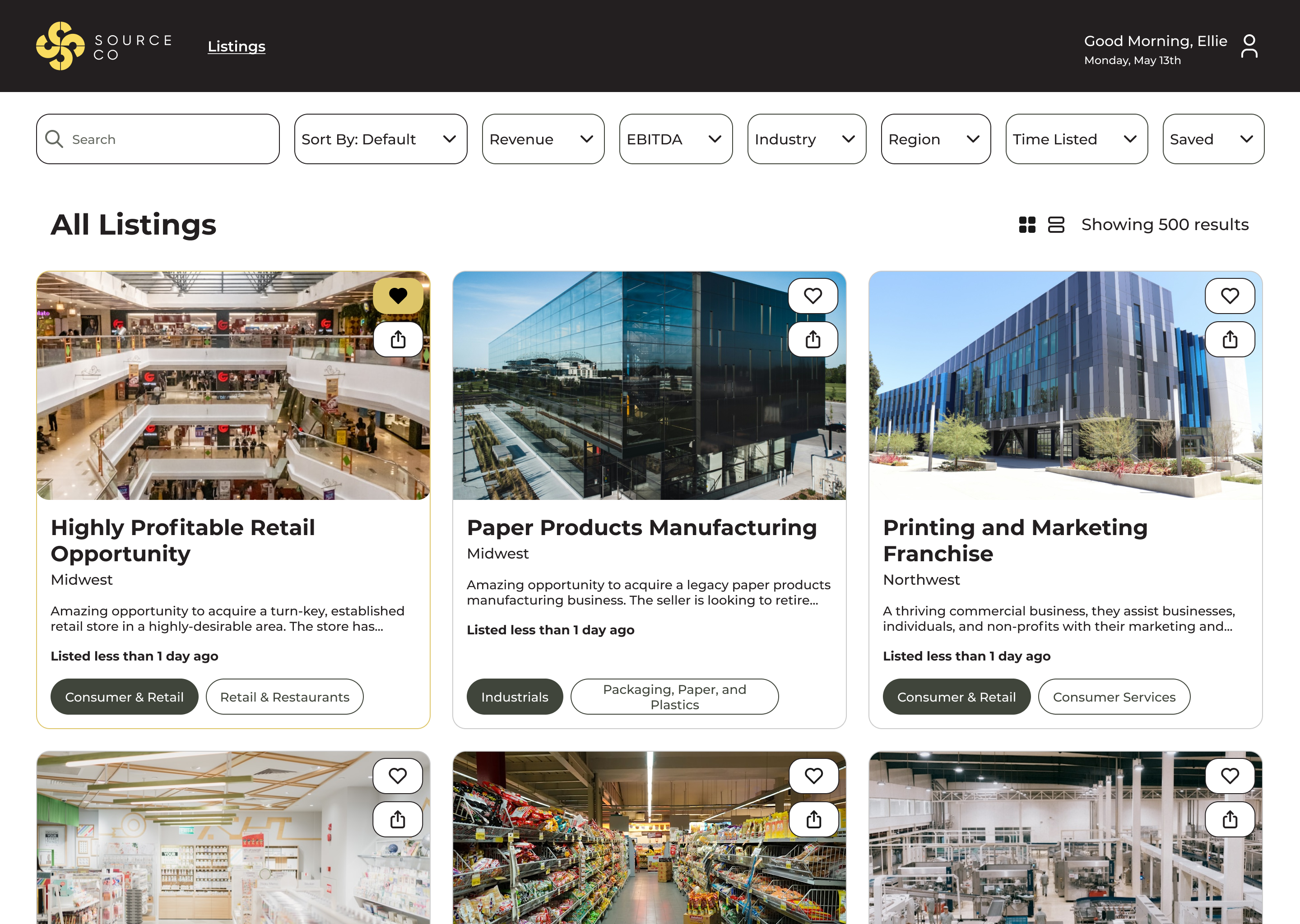
Desktop screenshot of a tile view of listings of businesses for sale

SourceCo is a middle-market M&A intermediary that asked us to design and build a marketplace for businesses for their clients, akin to BizBuySell. This was for desktop only.
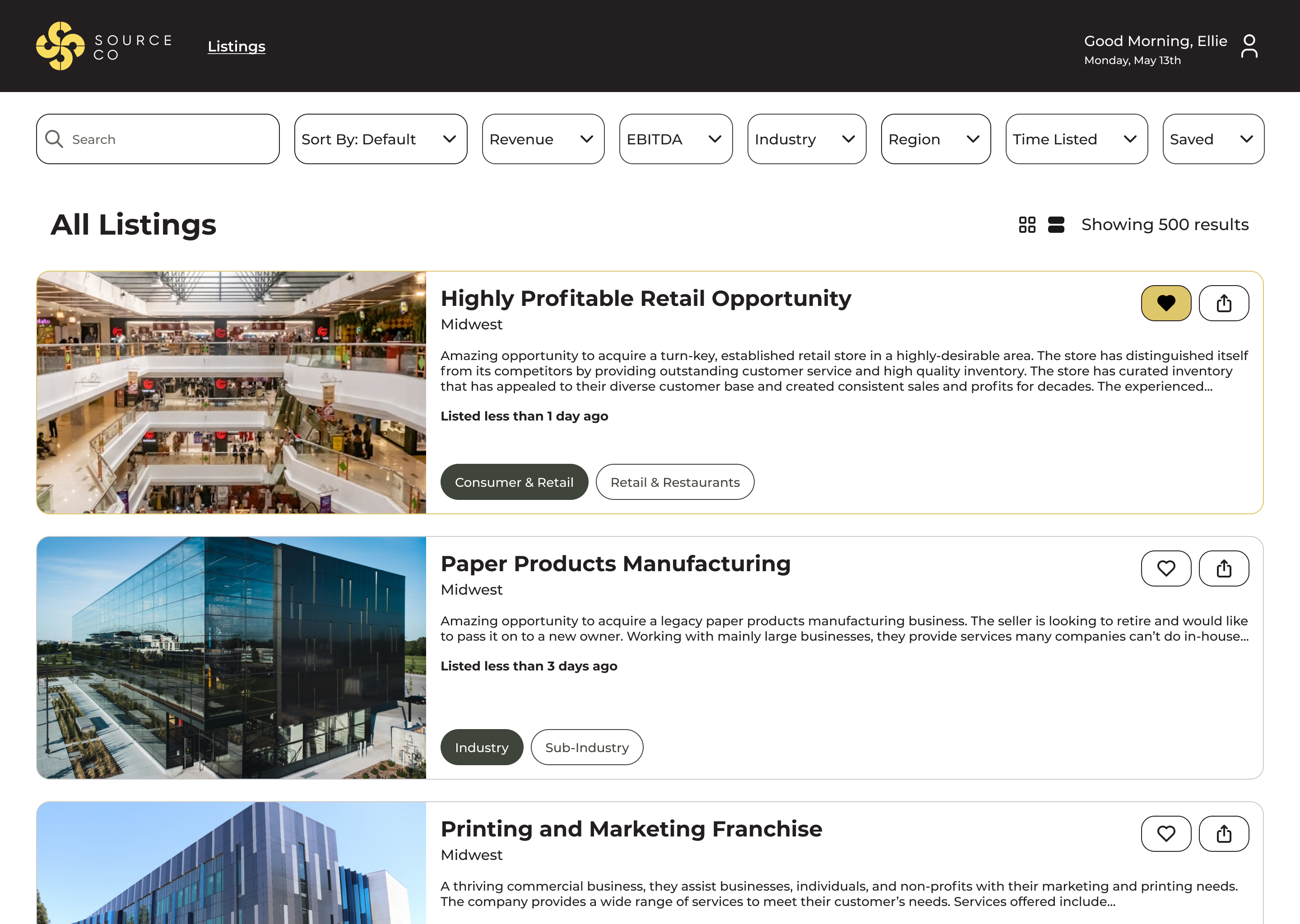
Desktop screenshot of a list view of listings of businesses for sale
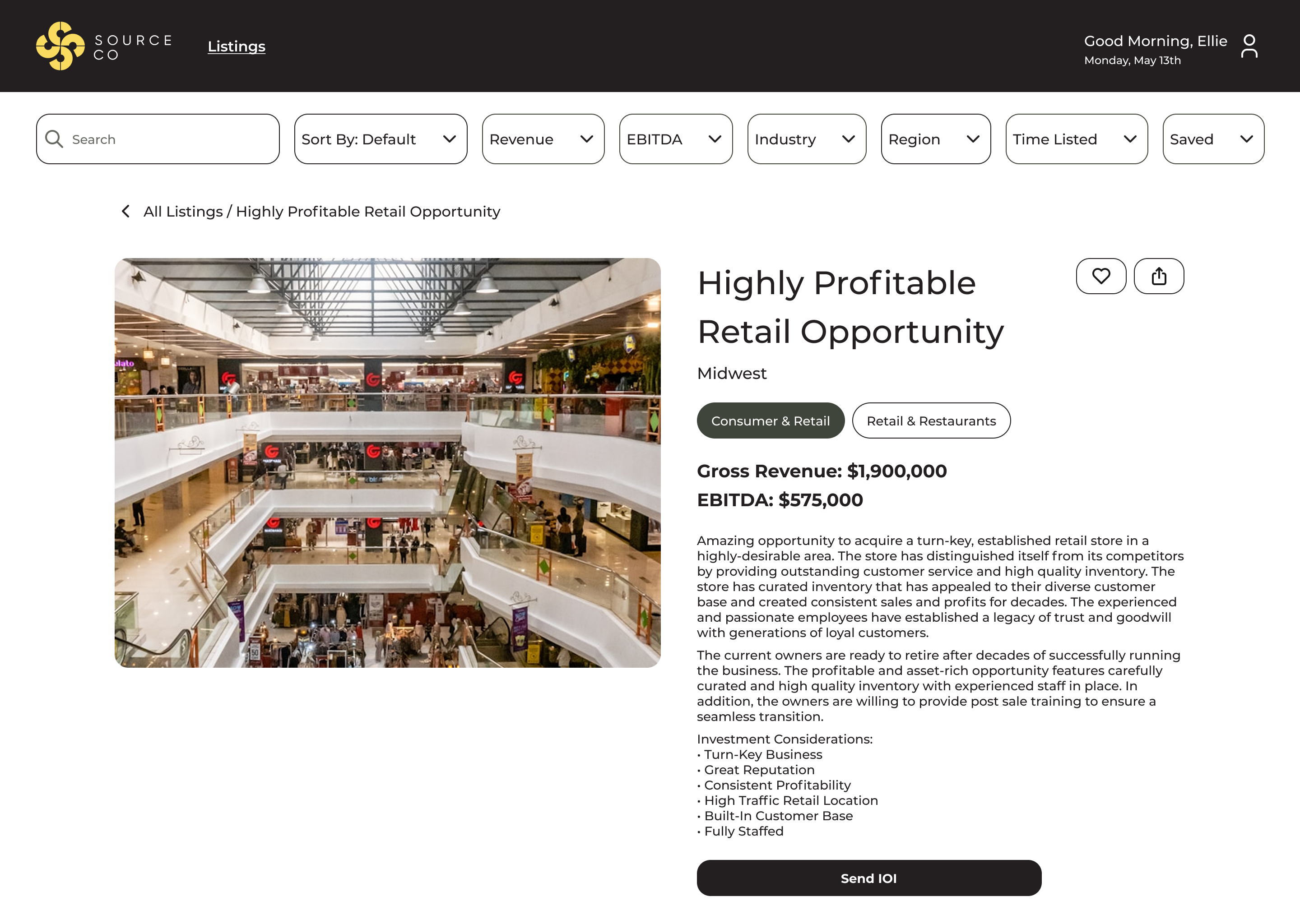
Desktop screenshot of listing information for a business for sale
Desktop screenshot of an admin dashboard of account requests, deals closed, filters, creating a new listing, and current listings

My Role

I was the lead designer on this project and relied heavily on my e-commerce experience to guide the direction of the marketplace.

Save/Favorite Listings

One function I brought specifically from e-commerce was the ability to favorite or save businesses, allowing clients to create a list of potential buys to compare. I also included the ability to share listings through email or copying the link, so clients could share among their teams. This really impressed the client, since it was something they hadn’t considered and thought that their clients would find really useful. This also allowed SourceCo employees to be able to see which listings a client has saved and reach out to them to help facilitate a deal. 

Desktop screenshot of an account dashboard with account information and saved listings
Desktop screenshot of search results for a person's saved listings

Create and Archive Listings

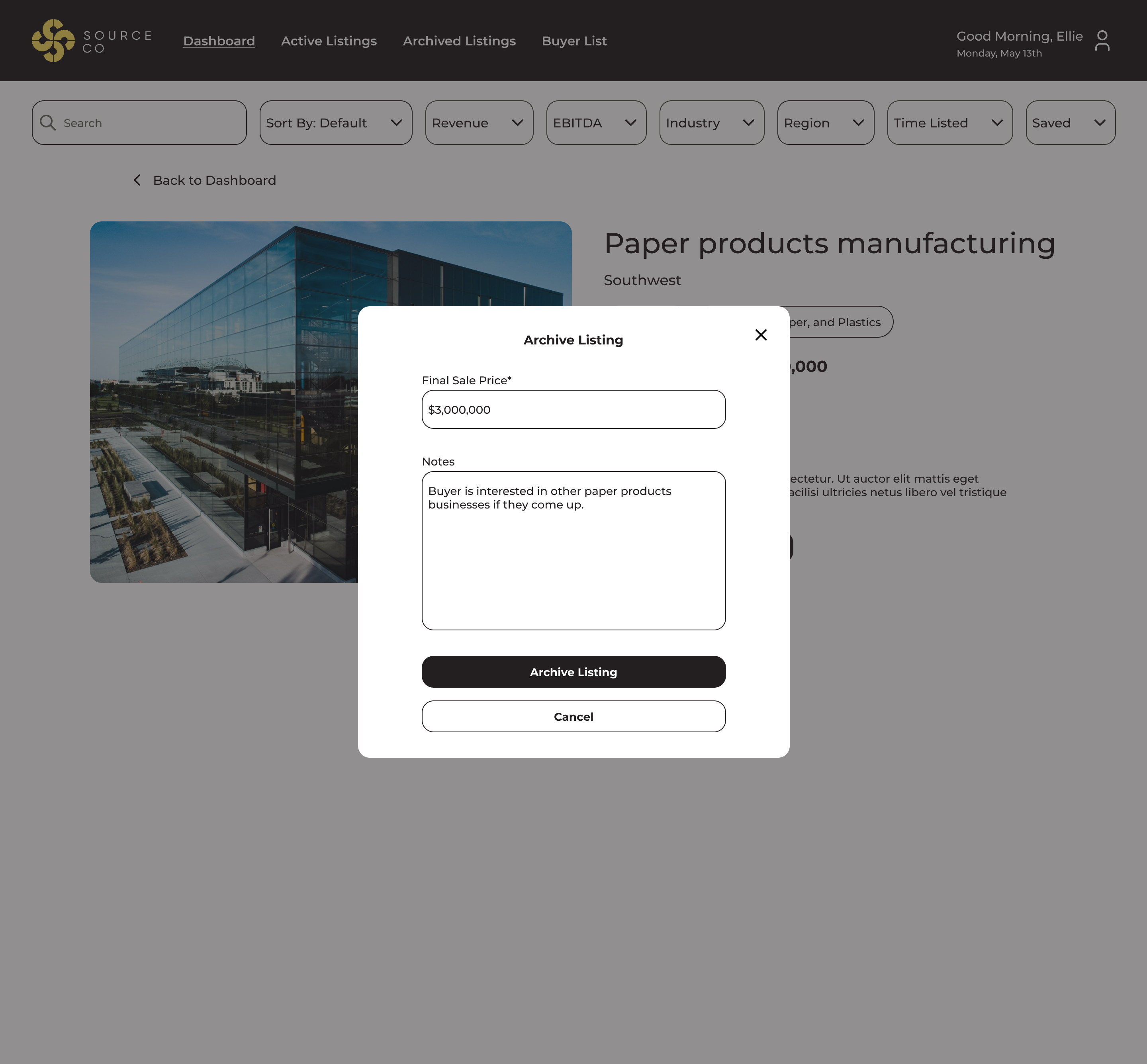
The biggest piece was the ability for admins to create and archive new listings on the marketplace. Creating a listing is just a standard form, and archiving a listing requires including the final sale price and allows for any notes on the sale. 

Desktop screenshot of form fields to create a new listing
Desktop screenshot of form fields to archive a listing
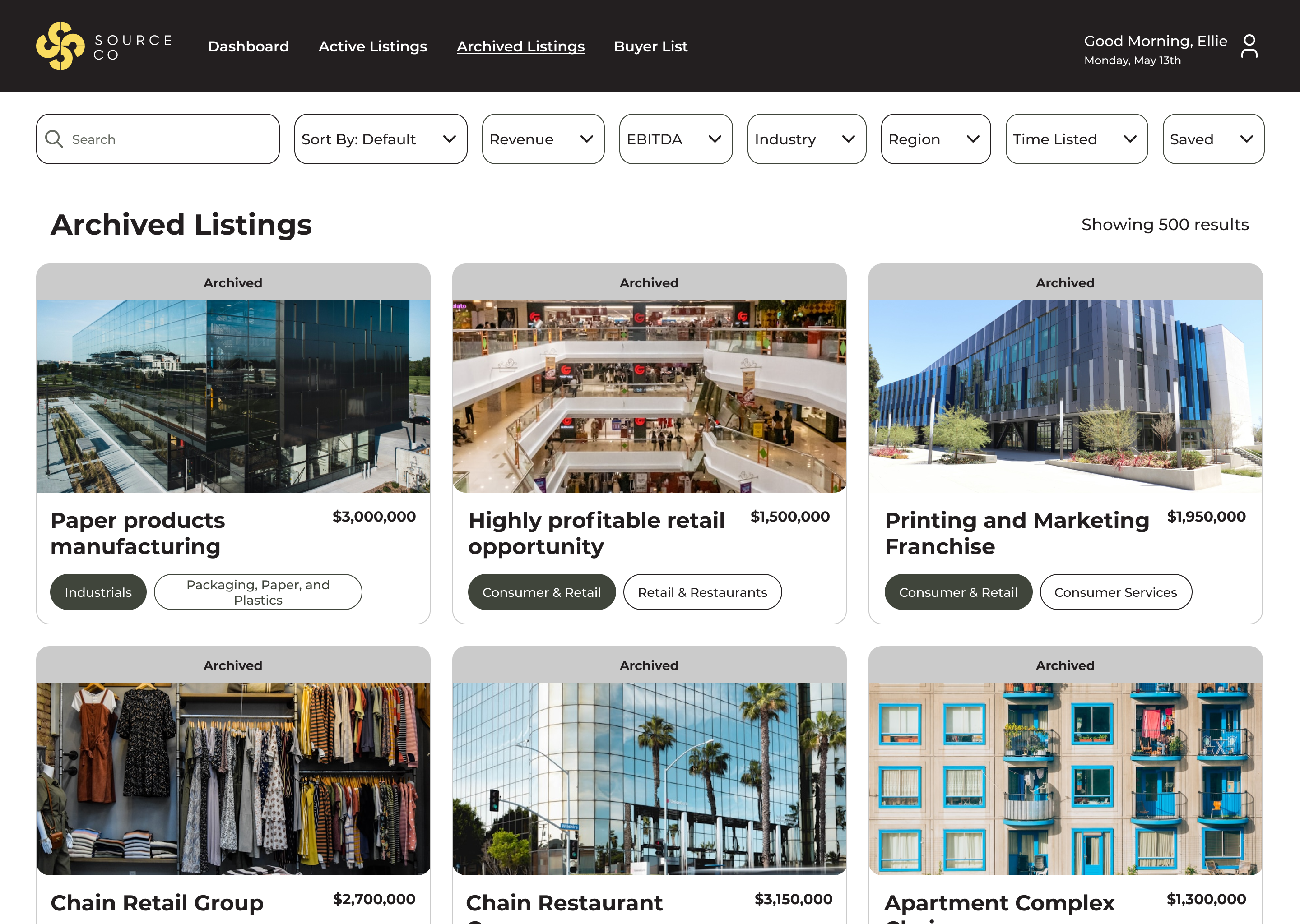
Desktop screenshot of archived listings

Deals Closed

They also requested a way to see how much they’ve closed in deals to date, so I included banner at the top of the admin dashboard that automatically updates when a listing is archived, but can also be manually updated if needed. 

Desktop screenshot of form field to update deals closed

UI

SourceCo already had a defined color palette and typography, so it was easy to plug in the UI.

Results

Although this is not a publicly available tool, from conversations with the client, they’re consistently onboarding new clients and continuing to grow the platform. They definitely consider it a success!

Final Thoughts

Looking back now, I would have liked to create a sidebar with more robust filtering options. When the project started, there were only a few filtering options that made sense as dropdowns, and the client wanted the filtering to be visible, but as it’s grown, more kept getting added. Anticipating additions and changes like these and designing for them up front to try and future-proof projects has been a big lesson learned for me.

I really enjoyed this project because I got to pull my experience in retail into a different context. As different as the actual products can be, the experience of buying and selling on an online marketplace is largely the same, and it was interesting to me how much carried over from bags to businesses. I learned a lot about looking past the surface to find similarities deep down in the architecture and user flows.

Let’s work together

Project

SourceCo Marketplace

Role: Lead Designer

Timeline: 6 months

Desktop screenshot of a tile view of listings of businesses for sale

SourceCo is a middle-market M&A intermediary that asked us to design and build a marketplace for businesses for their clients, akin to BizBuySell. This was for desktop only.
Desktop screenshot of a list view of listings of businesses for sale
Desktop screenshot of listing information for a business for sale
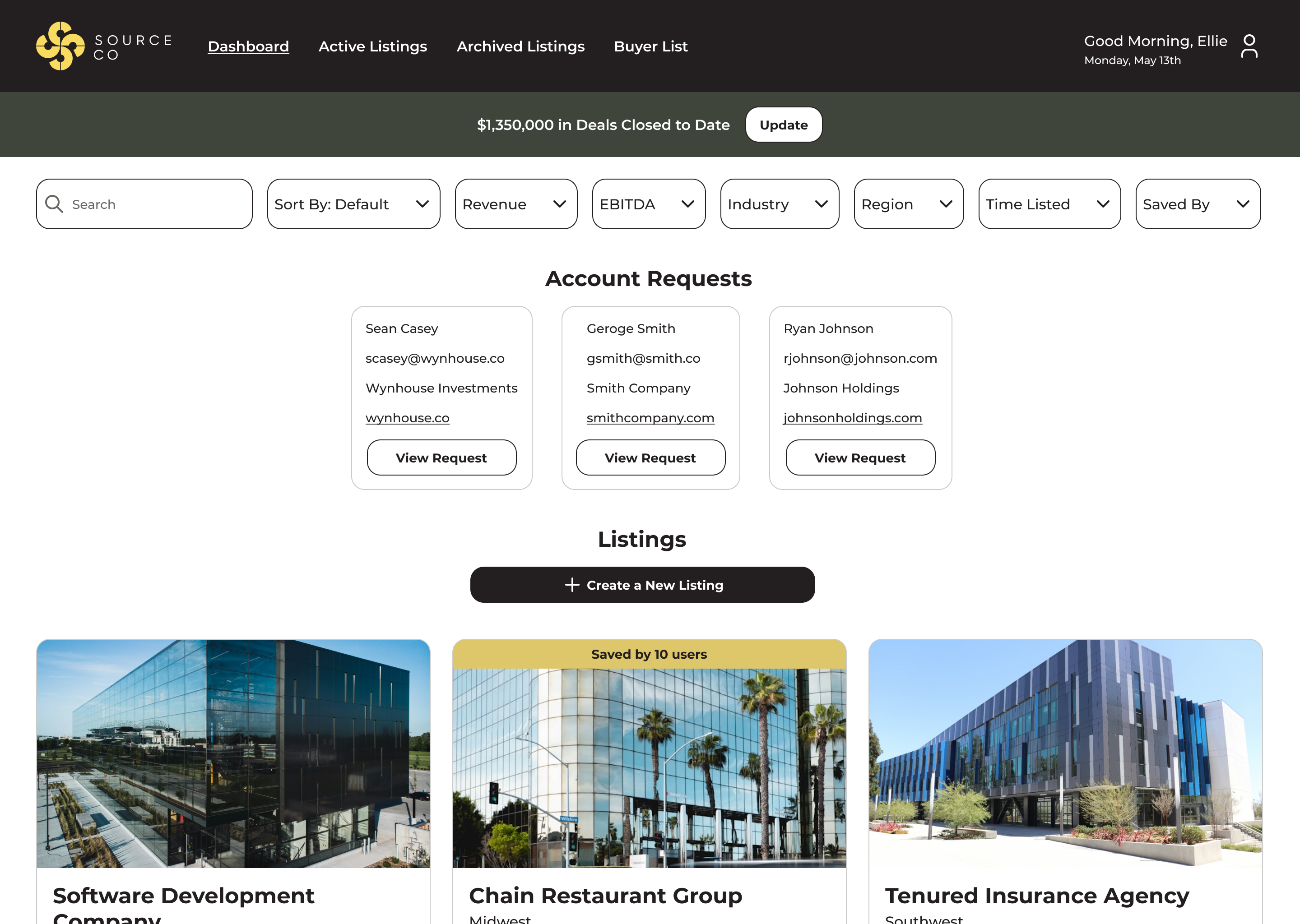
Desktop screenshot of an admin dashboard of account requests, deals closed, filters, creating a new listing, and current listings

My Role

I was the lead designer on this project and relied heavily on my e-commerce experience to guide the direction of the marketplace.

Save/Favorite Listings

One function I brought specifically from e-commerce was the ability to favorite or save businesses, allowing clients to create a list of potential buys to compare. I also included the ability to share listings through email or copying the link, so clients could share among their teams. This really impressed the client, since it was something they hadn’t considered and thought that their clients would find really useful. This also allowed SourceCo employees to be able to see which listings a client has saved and reach out to them to help facilitate a deal. 
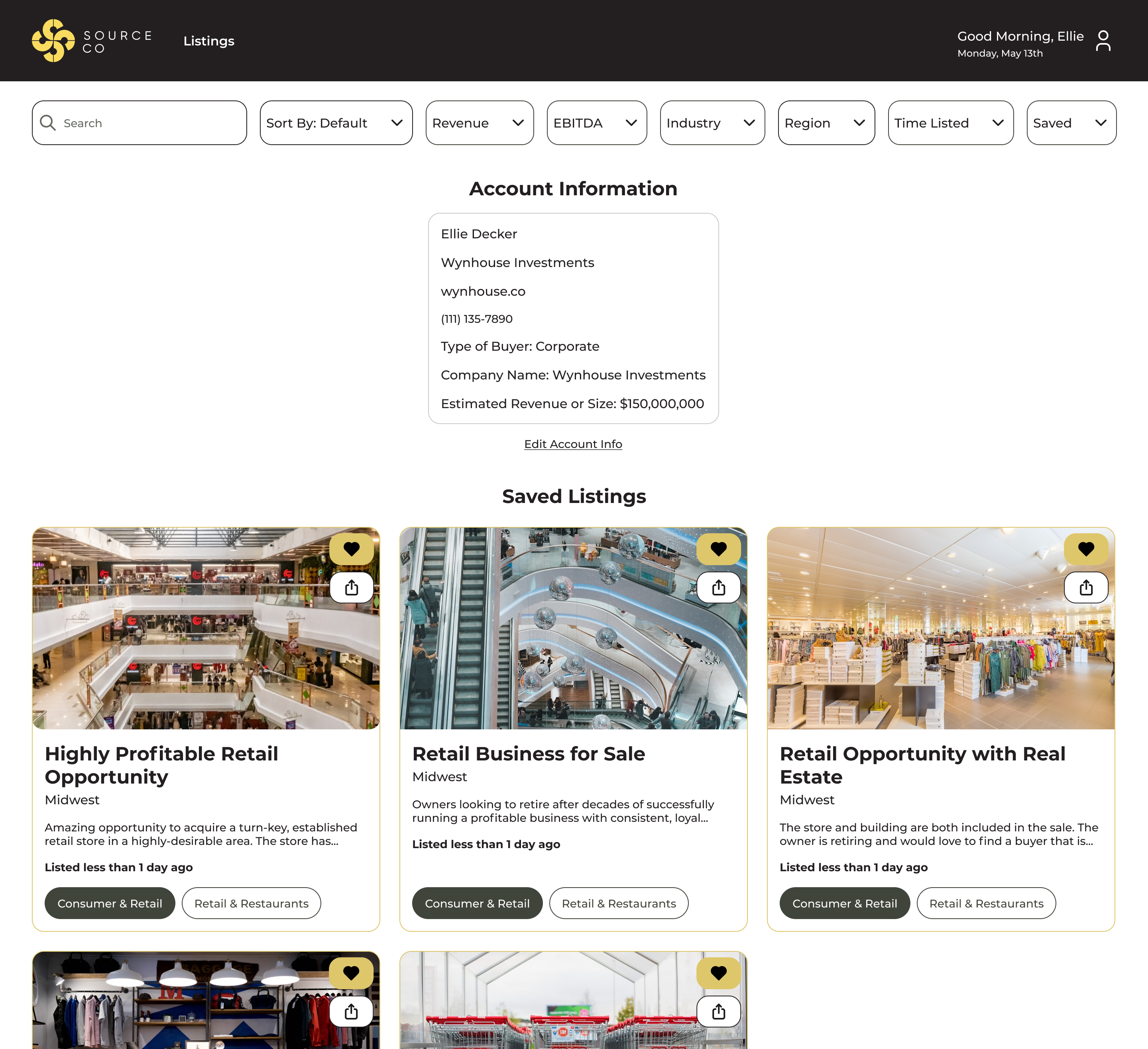
Desktop screenshot of an account dashboard with account information and saved listings
Desktop screenshot of search results for a person's saved listings

Create and Archive Listings

The biggest piece was the ability for admins to create and archive new listings on the marketplace. Creating a listing is just a standard form, and archiving a listing requires including the final sale price and allows for any notes on the sale. 

Desktop screenshot of form fields to create a new listing
Desktop screenshot of form fields to archive a listing
Desktop screenshot of archived listings

Deals Closed

They also requested a way to see how much they’ve closed in deals to date, so I included banner at the top of the admin dashboard that automatically updates when a listing is archived, but can also be manually updated if needed. 

Desktop screenshot of form field to update deals closed

UI

SourceCo already had a defined color palette and typography, so it was easy to plug in the UI.

Results

Although this is not a publicly available tool, from conversations with the client, they’re consistently onboarding new clients and continuing to grow the platform. They definitely consider it a success!

Final Thoughts

Looking back now, I would have liked to create a sidebar with more robust filtering options. When the project started, there were only a few filtering options that made sense as dropdowns, and the client wanted the filtering to be visible, but as it’s grown, more kept getting added. Anticipating additions and changes like these and designing for them up front to try and future-proof projects has been a big lesson learned for me.

I really enjoyed this project because I got to pull my experience in retail into a different context. As different as the actual products can be, the experience of buying and selling on an online marketplace is largely the same, and it was interesting to me how much carried over from bags to businesses. I learned a lot about looking past the surface to find similarities deep down in the architecture and user flows.

Let’s work together

Project

SourceCo Marketplace

Role: Lead Designer

Timeline: 6 months

Desktop screenshot of a tile view of listings of businesses for sale

SourceCo is a middle-market M&A intermediary that asked us to design and build a marketplace for businesses for their clients, akin to BizBuySell. This was for desktop only.

Desktop screenshot of a list view of listings of businesses for sale
Desktop screenshot of listing information for a business for sale
Desktop screenshot of an admin dashboard of account requests, deals closed, filters, creating a new listing, and current listings

My Role

I was the lead designer on this project and relied heavily on my e-commerce experience to guide the direction of the marketplace.

Save/Favorite Listings

One function I brought specifically from e-commerce was the ability to favorite or save businesses, allowing clients to create a list of potential buys to compare. I also included the ability to share listings through email or copying the link, so clients could share among their teams. This really impressed the client, since it was something they hadn’t considered and thought that their clients would find really useful. This also allowed SourceCo employees to be able to see which listings a client has saved and reach out to them to help facilitate a deal. 
Desktop screenshot of an account dashboard with account information and saved listings
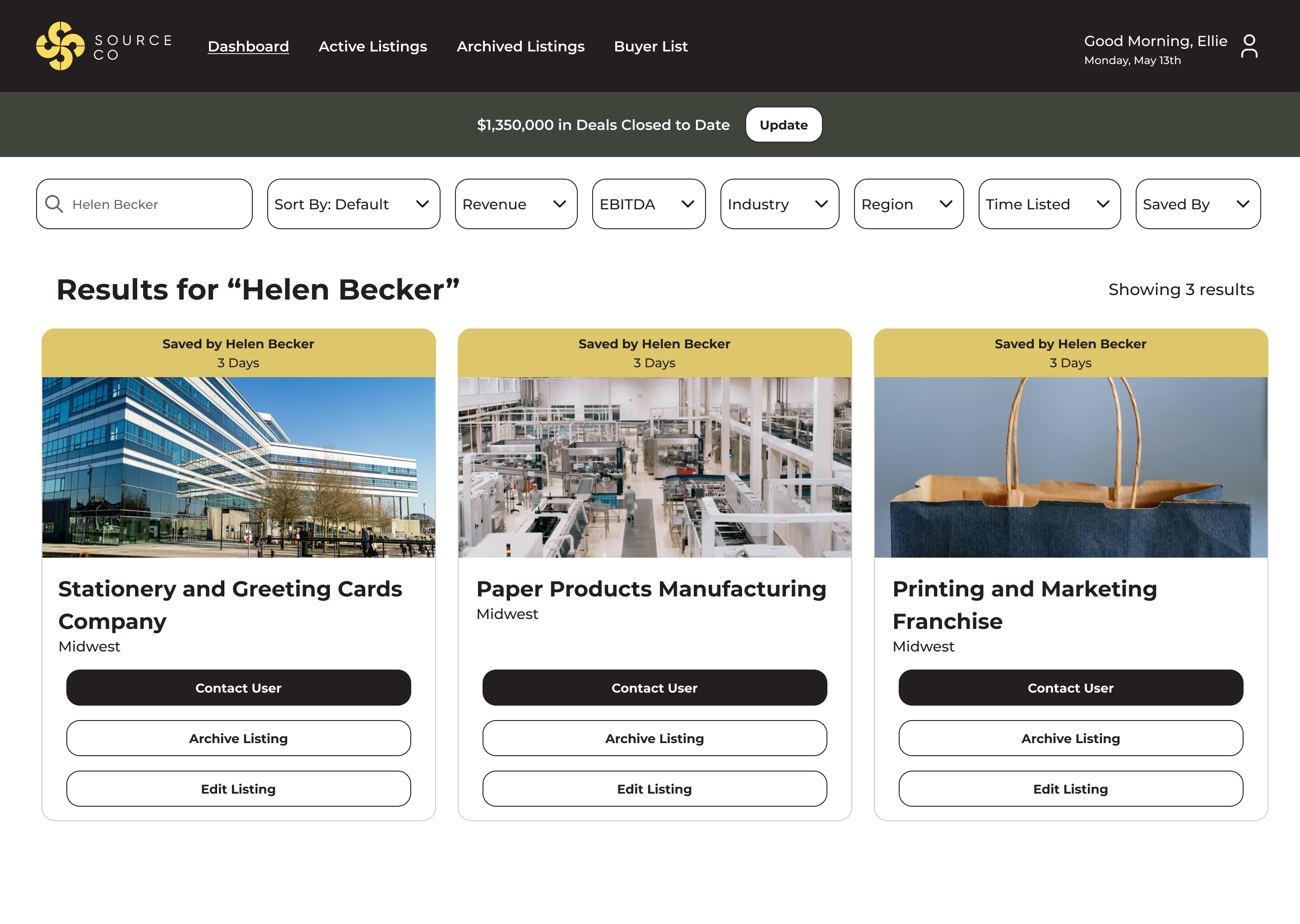
Desktop screenshot of search results for a person's saved listings

Create and Archive Listings

The biggest piece was the ability for admins to create and archive new listings on the marketplace. Creating a listing is just a standard form, and archiving a listing requires including the final sale price and allows for any notes on the sale. 
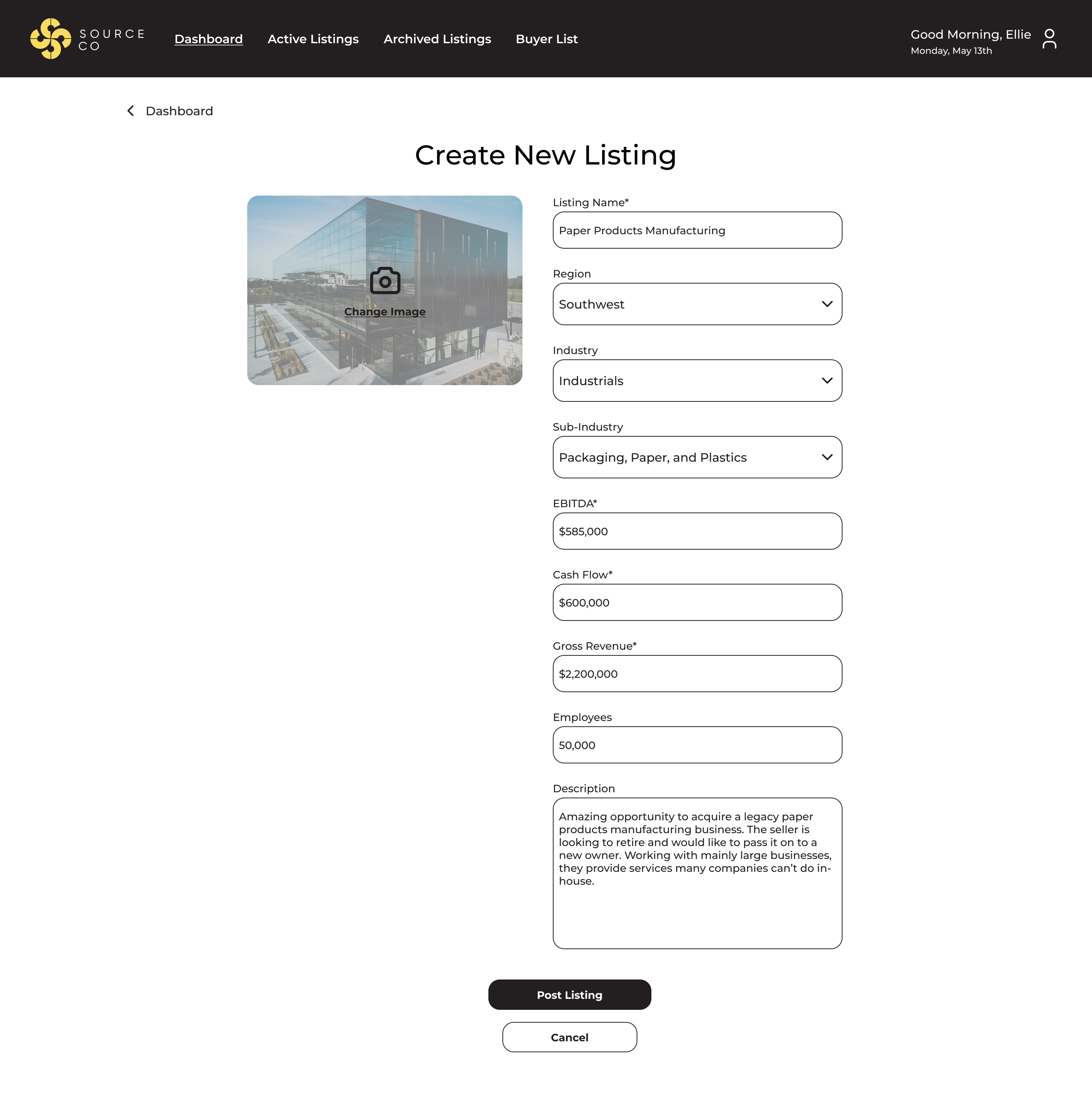
Desktop screenshot of form fields to create a new listing
Desktop screenshot of form fields to archive a listing
Desktop screenshot of archived listings

Deals Closed

They also requested a way to see how much they’ve closed in deals to date, so I included banner at the top of the admin dashboard that automatically updates when a listing is archived, but can also be manually updated if needed. 
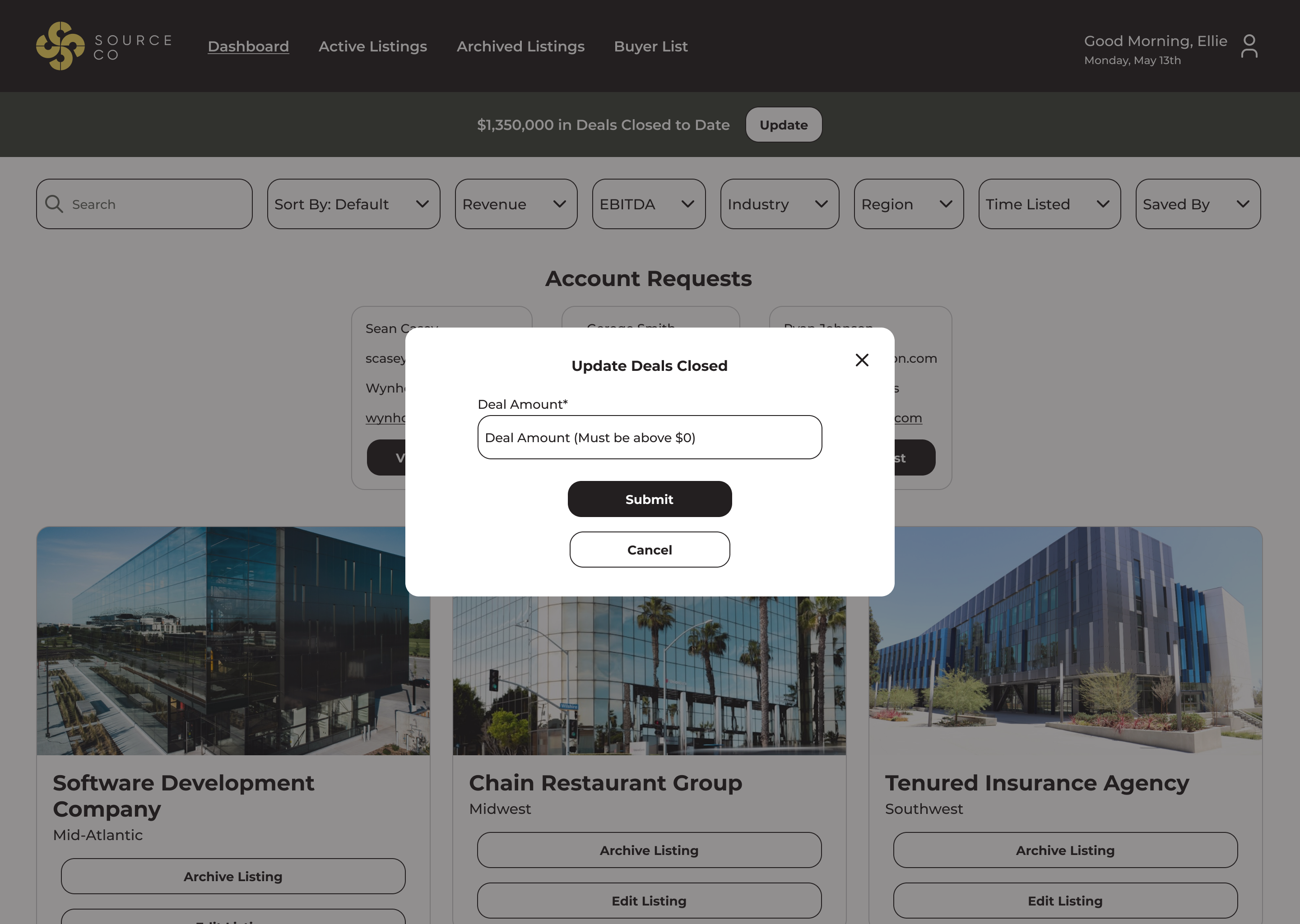
Desktop screenshot of form field to update deals closed

UI

SourceCo already had a defined color palette and typography, so it was easy to plug in the UI.

Results

Although this is not a publicly available tool, from conversations with the client, they’re consistently onboarding new clients and continuing to grow the platform. They definitely consider it a success!

Final Thoughts

Looking back now, I would have liked to create a sidebar with more robust filtering options. When the project started, there were only a few filtering options that made sense as dropdowns, and the client wanted the filtering to be visible, but as it’s grown, more kept getting added. Anticipating additions and changes like these and designing for them up front to try and future-proof projects has been a big lesson learned for me.

I really enjoyed this project because I got to pull my experience in retail into a different context. As different as the actual products can be, the experience of buying and selling on an online marketplace is largely the same, and it was interesting to me how much carried over from bags to businesses. I learned a lot about looking past the surface to find similarities deep down in the architecture and user flows.